【Seaborn】relplotによる2変数間の関係の可視化
公開日 2023-08-27
Seabornのrelplot関数は、散布図または折れ線グラフによって、2変数間の関係を可視化する機能を持っています。この記事では、relplot関数の使用方法とオプションについて解説します。
relplot関数の基本
まず、relplot関数でプロットするデータとして、tipsデータセットを取得します。
import seaborn as sns

df = sns.load_dataset("tips")
dftipsデータセットは以下の7変数を持ち、データ数は244個です。
total_bill: 食事の代金(USドル)
tip: チップの額(USドル)
sex: 性別
smoker: 喫煙者か否か
day: 曜日(木曜~日曜のいずれか)
time: 食事の時間(昼食または夕食)
size: 人数
これをrelplot関数でプロットします。引数dataにDataFrameを与え、x, yにそれぞれx, y軸に表示したい変数を与えます。
sns.relplot(data=df, x="total_bill", y="tip")<seaborn.axisgrid.FacetGrid at 0x21112b07b60>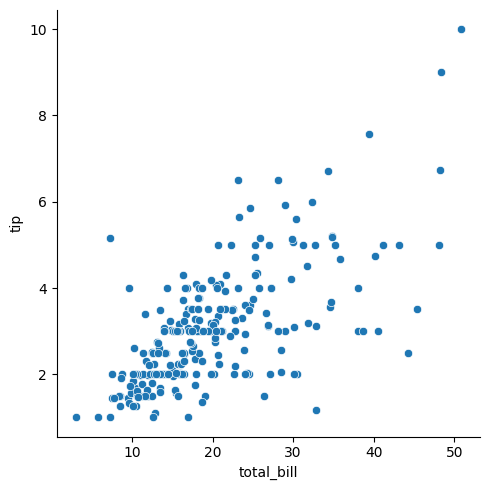
このように2変数の関係が散布図としてプロットされます。
relplot関数の主なオプションを以下に示します。
| オプション | 型 | 説明 |
|---|---|---|
| x/y | str | x, y軸の変数 |
| kind | str | グラフの種類。scatrer: 散布図(デフォルト)、line: 折れ線グラフ |
| hue | str | 色分けをするカテゴリ変数名 |
| hue_order | list of str | hueの順番 |
| palette | dict/str | hueの色を指定。カラーマップも指定可能 |
| size | str | 散布図のマーカーサイズに対応させる変数名 |
| style | str | 散布図のマーカー種類や、折れ線グラフの線の種類を変更する変数名 |
| row | str | 複数グラフに分割するときに、縦方向のキーとなる変数名 |
| col | str | 複数グラフに分割するときに、横方向のキーとなる変数名 |
| row_order | list of str | rowオプションの順序を指定 |
| col_order | list of str | colオプションの順序を指定 |
| col_wrap | int | rowを指定したときの1行あたりのグラフの数 |
| height | float | 各グラフの高さ |
| aspect | float | aspect*heightがグラフの横幅になる |
変数による色分け
hueオプションに変数を指定することにより、変数の値ごとに色分けされたグラフが出力されます。
sns.relplot(data=df, x="total_bill", y="tip", hue="day")<seaborn.axisgrid.FacetGrid at 0x21112fd79d0>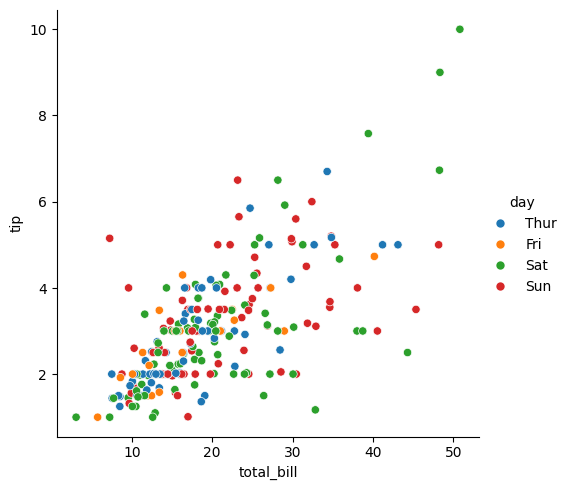
paletteオプションでは、カテゴリ変数ごとの色を指定できます。指定方法は2つあります。1つは辞書形式で、変数ごとに色の名前を指定します。
sns.relplot(data=df, x="total_bill", y="tip", hue="day",
            palette={"Thur": "red",
                     "Fri": "blue",
                     "Sat": "green",
                     "Sun": "orange"})
<seaborn.axisgrid.FacetGrid at 0x21112ae7c50>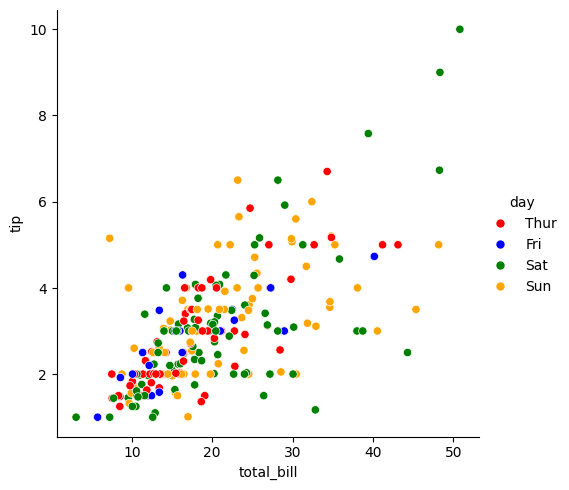
もう1つの方法は、カラーマップの名前を与える方法です。指定可能なカラーマップについては以下のページを参照下さい。
sns.relplot(data=df, x="total_bill", y="tip", hue="day",
            palette="Blues")
<seaborn.axisgrid.FacetGrid at 0x21112fd7750>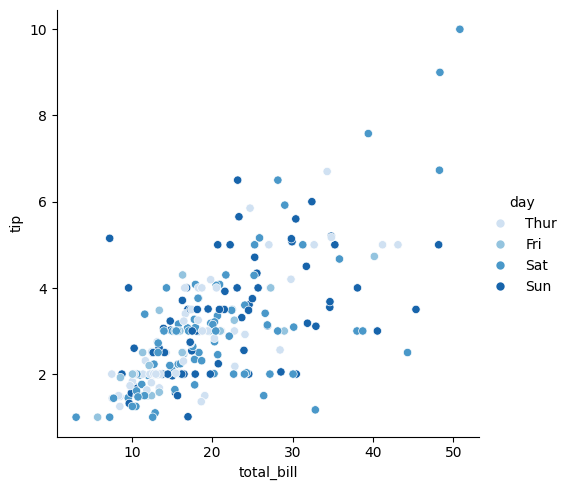
また、hueオプションには、カテゴリ変数だけでなく数値変数を与えることも可能です。size(人数)で色分けした例を示します。
sns.relplot(data=df, x="total_bill", y="tip", hue="size")<seaborn.axisgrid.FacetGrid at 0x21112fd7890>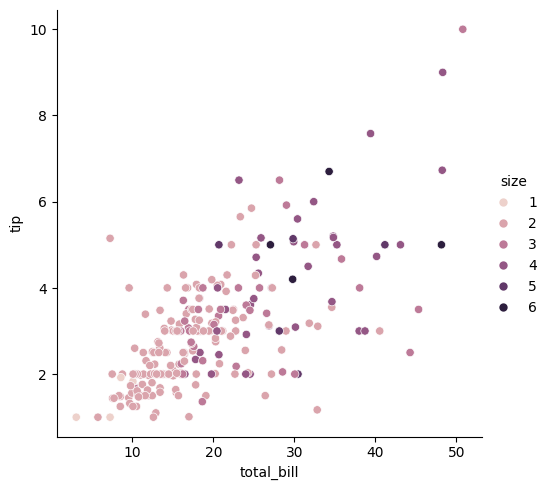
マーカーのサイズ
sizeオプションに数値データ名を与えると、数値の大きさに応じてマーカーのサイズが変化します(※以下の例では、sizeオプションに与えた"size"はDataFrameの列名の"size"(人数
)のことです)。
sns.relplot(data=df, x="total_bill", y="tip", size="size")<seaborn.axisgrid.FacetGrid at 0x2111464e490>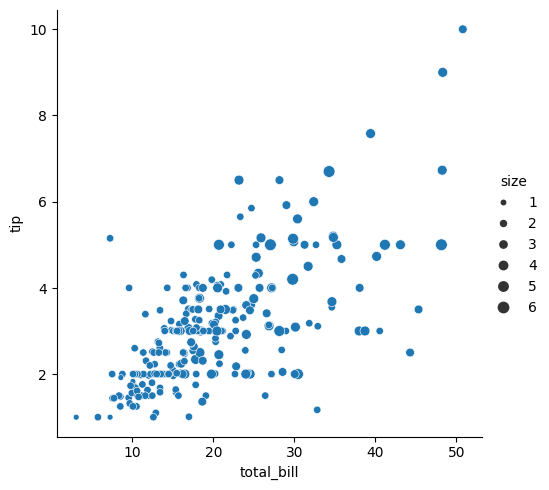
マーカーの種類
styleオプションに変数を指定することにより、変数の値ごとにマーカーの種類が異なるグラフが出力されます。styleオプションとhueオプションを併用することも可能です。
sns.relplot(data=df, x="total_bill", y="tip", style="day")<seaborn.axisgrid.FacetGrid at 0x2111464e350>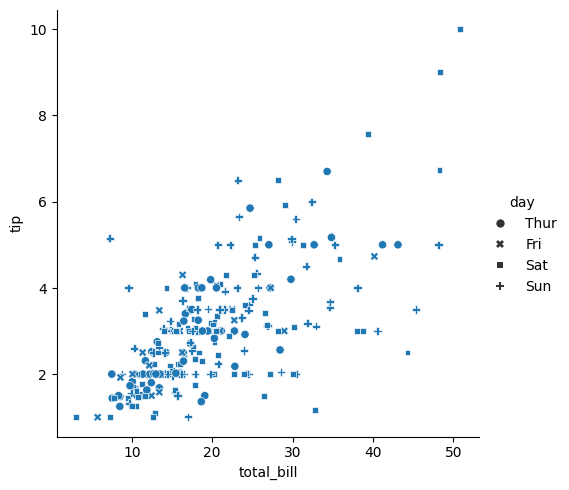
sns.relplot(data=df, x="total_bill", y="tip",
            style="time", hue="day")
<seaborn.axisgrid.FacetGrid at 0x21114762fd0>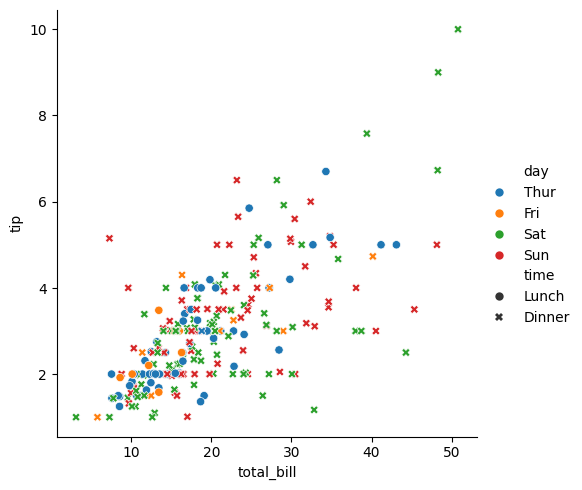
複数グラフへ分割
row, colオプションに変数名を渡すことにより、その変数の値でデータを分割し、縦・横方向にグラフを並べてプロットします。rowオプションに"time"(食事の時間)を渡して、グラフを縦方向に分割した例を以下に示します。
sns.relplot(data=df, x="total_bill", y="tip", row="time")<seaborn.axisgrid.FacetGrid at 0x21114b79f90>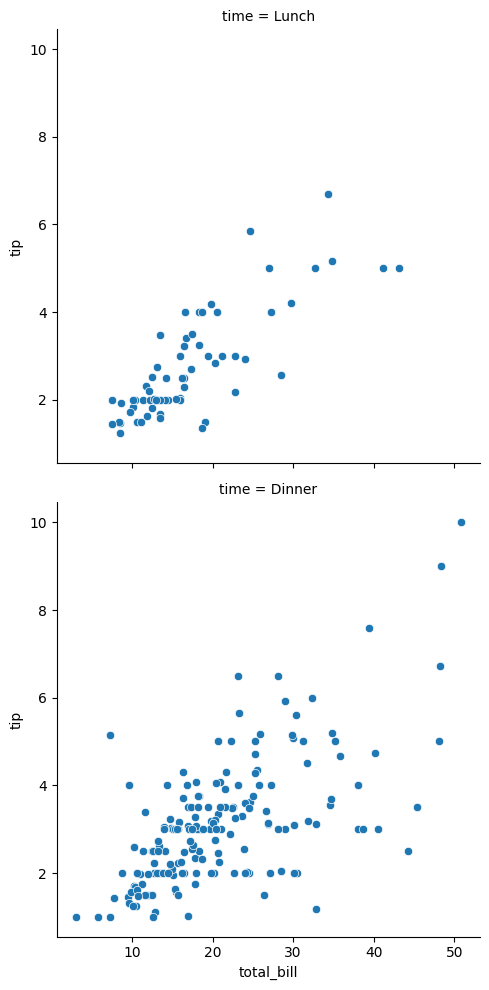
colオプションに"smoker"(喫煙者か否か)を渡して、グラフを横方向に分割した例を以下に示します。
sns.relplot(data=df, x="total_bill", y="tip", col="smoker")<seaborn.axisgrid.FacetGrid at 0x21114c7fed0>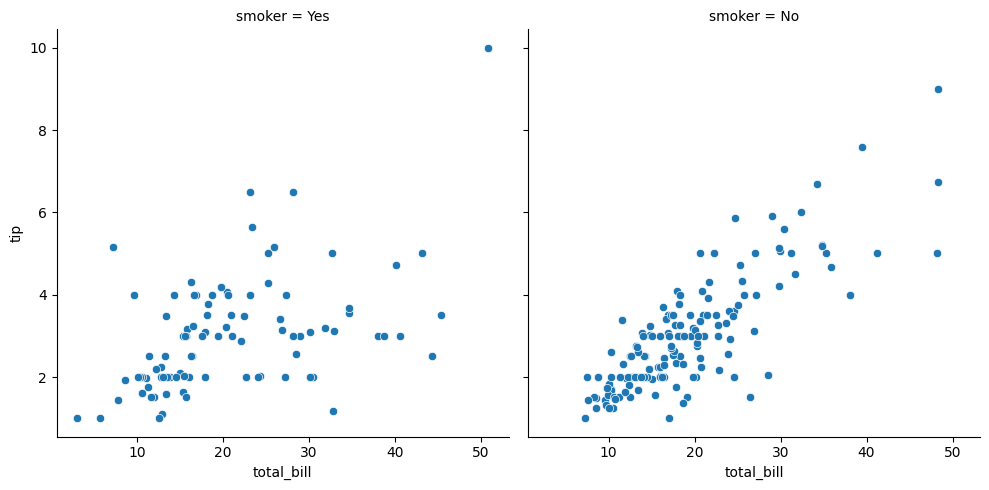
row, colオプションを同時に使用することも可能です。その場合、グラフは縦・横の両方向に分割されます。
sns.relplot(data=df, x="total_bill", y="tip",
            row="time", col="smoker")
<seaborn.axisgrid.FacetGrid at 0x211152c2350>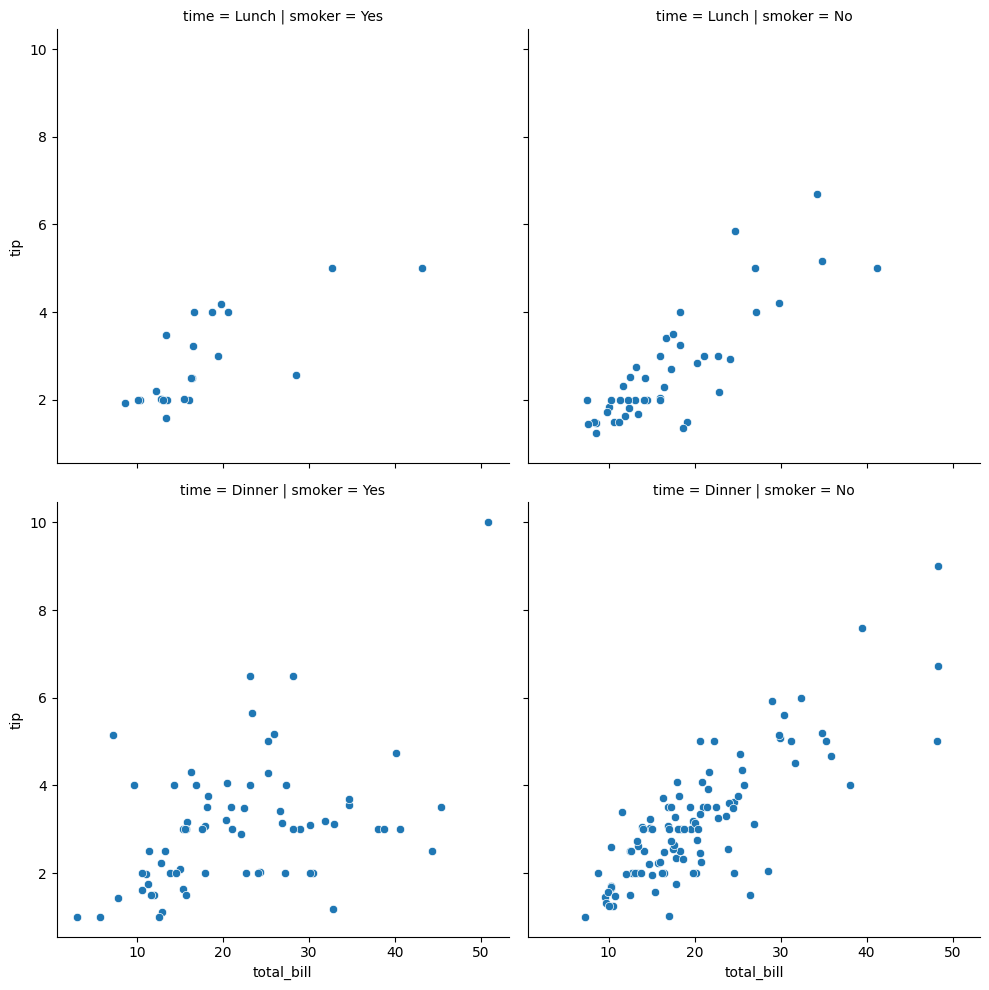
折れ線グラフ
relplot関数のkindオプションを"line"とすることにより、折れ線グラフとしてプロットできます。ここでは、fmriというデータセットを用います。
fmri = sns.load_dataset("fmri")
fmritimepointというラベルには、同じ値のデータが複数個含まれています。fmriを折れ線グラフとしてプロットします。
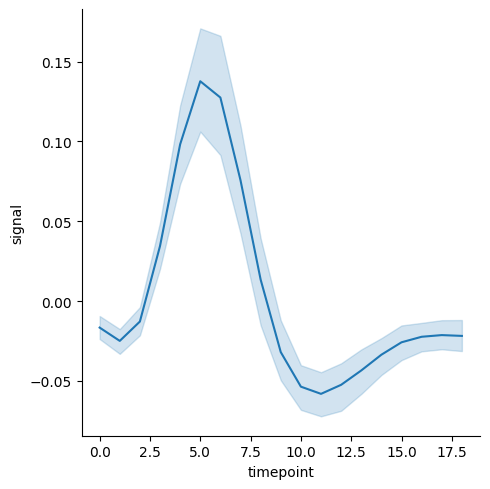
sns.relplot(data=fmri, x="timepoint", y="signal", kind="line")<seaborn.axisgrid.FacetGrid at 0x21115817b10>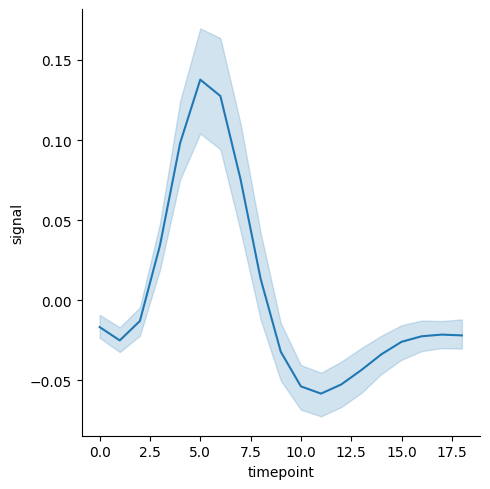
薄い水色の区間は、95%信頼区間 (Confidence interval, CI) を示します。
散布図の場合と同様に、折れ線グラフでもhue, style, col, rowオプションなどにより、データを分割してプロットすることが可能です。
sns.relplot(data=fmri, x="timepoint", y="signal",
            kind="line", hue="event")
<seaborn.axisgrid.FacetGrid at 0x21116015bd0>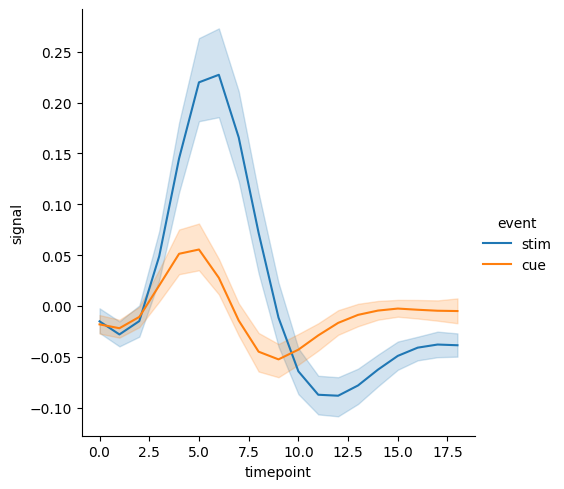
sns.relplot(data=fmri, x="timepoint", y="signal",
            kind="line", style="event")
<seaborn.axisgrid.FacetGrid at 0x21116062710>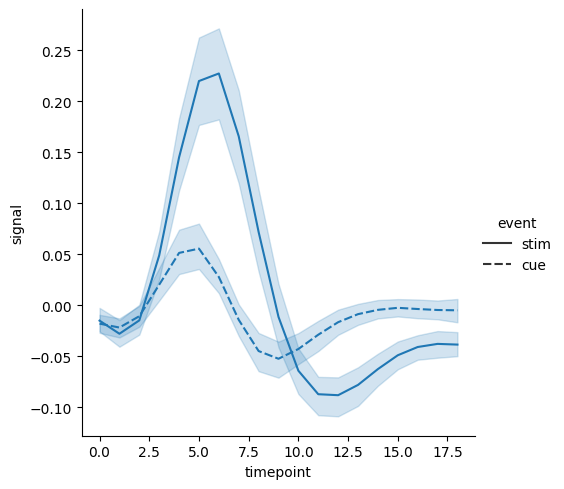
グラフの保存
relplot関数で出力したグラフをファイルとして保存するには、relplot関数の戻り値 (rg) のsavefig()メソッドを使用します。引数に保存するファイル名を与えます。
rg = sns.relplot(data=fmri, x="timepoint", y="signal", kind="line")
rg.savefig("relplot.png")